Every export shipment starts the same way. Someone opens a folder, finds last month's invoice, changes the buyer's name, updates the quantity, fixes the HS code, saves it with a new filename, and then spends the next twenty minutes wondering if they got the unit price right. Then they do it again for the packing list. Then again for the proforma.
This is not document creation. This is copy-paste work dressed up as operations.
If you're managing export documentation manually, this loop probably sounds familiar. And the problem isn't just that it's tedious. It's that every repetition is a new opportunity for error, and in international trade, errors don't just slow things down. They stop shipments.
Export documentation software exists to break this loop. But most teams don't realize they need it until something goes wrong.
Why Export Documentation Is Still Broken in Most Companies
The average export shipment requires anywhere from five to twelve documents depending on the destination, commodity, and trade agreement. A commercial invoice. A packing list. A certificate of origin. A bill of lading. A proforma invoice for customs. Sometimes a phytosanitary certificate, a dangerous goods declaration, or an export license.
Each document needs to be accurate. Each needs to be formatted correctly for the receiving country. And each needs to be consistent with the others because customs authorities cross-check them.
When these documents are built manually, using spreadsheets or recycled Word files, the risk compounds fast. A transposed digit in the HS code on the commercial invoice that doesn't match the packing list is enough to hold a shipment at port. A missing field on a customs document can trigger a compliance review. A wrong unit of measurement on the packing list can create a discrepancy that takes days to resolve.
These are not edge cases. They happen regularly in teams that rely on manual export document workflows.
The Hidden Cost of Manual Documentation
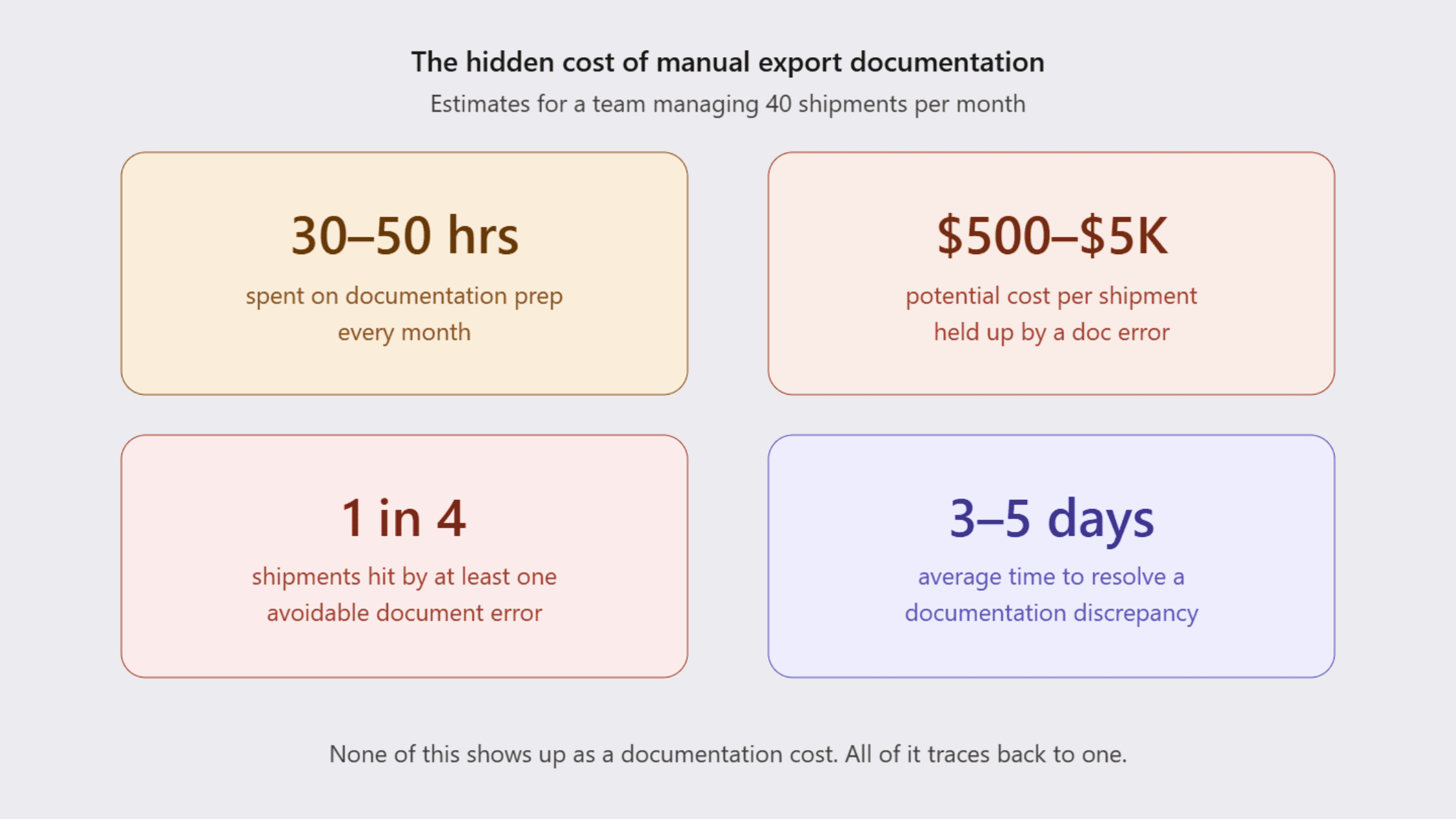
Most export teams calculate their documentation overhead in hours. In reality, the cost sits somewhere else entirely.
Consider a mid-sized exporter shipping to fifteen countries. Their documentation team handles roughly forty shipments a month. Each shipment requires three to five documents. Each document takes fifteen to twenty-five minutes to prepare, review, and format correctly. That's somewhere between thirty and fifty hours of documentation work per month, and that's before accounting for corrections.
Now factor in the downstream costs. A shipment delayed by one day due to a documentation error can cost hundreds to thousands of dollars in demurrage, storage, or expedited logistics. A compliance issue in a destination country can mean rejected cargo, re-exports, or fines. A buyer receiving an invoice with incorrect incoterms or bank details can hold payment for weeks.
None of this shows up as a documentation cost on a P&L. But it all traces back to documentation.
How do you reduce export documentation errors? The direct answer is: you reduce the number of times a human has to enter the same data. Every manual entry is a chance for error. Export document automation removes repetitive data entry from the equation by pulling information from a single source and populating it across all required documents automatically.
Why Excel and Email Don't Scale
Excel is a genuinely capable tool. So is email. The problem is that neither was designed for shipment workflow management.
When your commercial invoice template lives in a shared drive, three people have edit access, and the "final" version has six copies saved with slightly different names, you don't have a document system. You have a liability.
Email-based document workflows have the same problem. When approvals, revisions, and final files are scattered across inboxes, there's no version control, no audit trail, and no way to know which document actually went out with the shipment. If a customs authority asks for a specific version of a packing list from three months ago, the answer shouldn't be "let me check my inbox."
The issue with these tools isn't capability. It's architecture. They weren't built for the volume, consistency, and compliance requirements of export operations. As shipment volumes grow, the gaps in manual systems don't stay the same size. They get wider.
What is the best way to manage export documents? A centralized shipping document management system where templates, data, and approvals live in one place, accessible to everyone who needs them and no one who doesn't.
What Export Document Automation Actually Looks Like
What is export documentation automation? It's the process of using software to generate, populate, and manage shipment documents by connecting them to a shared data source, so the same buyer details, product information, and shipment data don't need to be entered multiple times across multiple documents.
This is what Freightnaut's export documentation module is built to do.
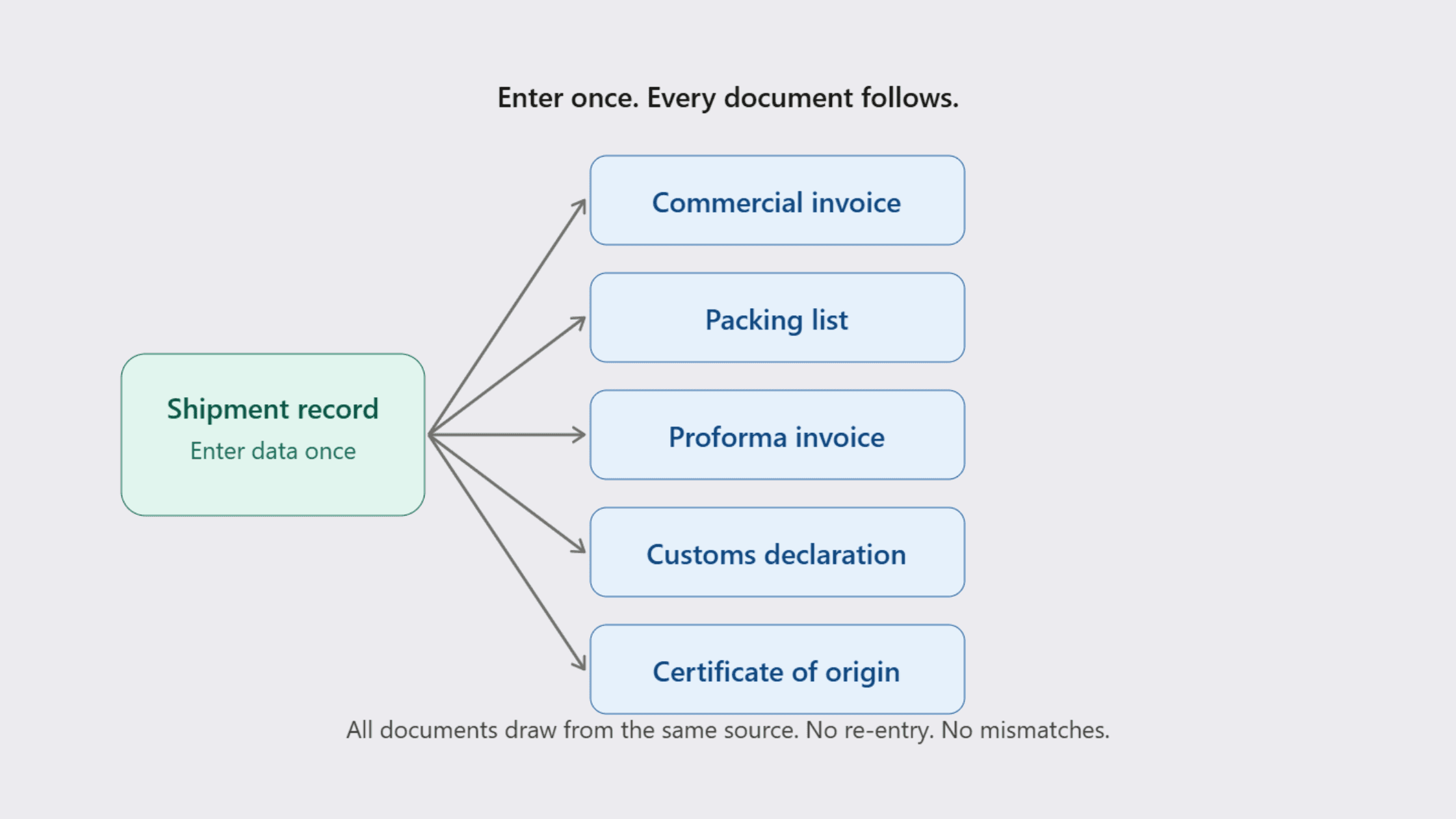
Rather than treating each document as a standalone task, Freightnaut treats a shipment as a single data event. You enter the core information once: the exporter, the consignee, the product details, the shipment terms, the applicable HS codes. The platform uses that data to auto-fill the relevant fields across every document tied to that shipment.
The commercial invoice template pulls from the same data as the packing list template. The proforma invoice reflects the same pricing logic. The customs documents reference the same commodity codes. Consistency isn't something the team has to manually verify. It's built into how the system works.
How the Workflow Actually Runs
Here's what document preparation looks like inside Freightnaut:
Step 1: Set up your templates. Freightnaut comes with pre-built document templates for exporters, including commercial invoice templates, packing list templates, proforma invoices, and customs-ready formats. These can be customized to match your company's formatting, letterhead, and specific trade lane requirements.
Step 2: Enter shipment data once. When a new shipment is created, the relevant buyer, product, and logistics data is entered into the shipment record. This becomes the single source of truth for all documents in that shipment.
Step 3: Auto-generate documents. The platform pulls from the shipment record to populate each document automatically. Fields that are consistent across documents, like the exporter address, consignee details, and HS codes, are filled without manual input.
Step 4: Review, approve, and export. Documents are reviewed within the platform before being finalized. Once approved, they can be exported in the required format and attached to the shipment record for reference.
Step 5: Reuse for repeat buyers or lanes. When you're shipping to the same buyer again, the saved data means document prep time drops dramatically. Templates carry forward, and only shipment-specific variables need to be updated.
The Outcomes That Actually Matter
Logistics workflow automation isn't about making technology feel impressive. It's about measurable operational change.
Faster document turnaround. What used to take an hour per shipment can take fifteen minutes. For teams handling high shipment volumes, this is a significant reduction in turnaround time, especially when freight deadlines are tight.
Fewer errors across documents. When data flows from one source to all documents, the mismatches that come from independent manual entry disappear. Consistent formatting, consistent data, consistent compliance.
Better export compliance documentation. Compliance failures often come from outdated templates or fields that were manually skipped. Standardized templates with required fields help teams stay aligned with destination country requirements.
Centralized document control. Every document lives in one place, linked to its shipment. No more version confusion, no more searching through email chains, no more wondering which file actually shipped.
Faster onboarding for new team members. When documentation follows a defined process with fixed templates, new staff can be productive far sooner than in environments where everything is ad hoc.
Where This Makes the Biggest Difference
Export document automation adds value across a range of document types and use cases:
Commercial invoice: One of the most frequently issued and most frequently incorrect documents in export. Auto-filling buyer details, pricing, and HS codes from a single source removes the main sources of discrepancy.
Packing list: Needs to match the invoice exactly. When both draw from the same shipment record, consistency is automatic rather than something someone has to double-check.
Proforma invoice: Used for customs valuation and buyer approvals. Template-based generation ensures the format and data hold up under customs scrutiny.
Customs documents: Destination-specific requirements vary. Standardized templates built for specific trade lanes ensure that the right fields are present and correctly labeled.
Certificate of origin and compliance documents: For regulated goods or preferential trade agreements, accurate and consistent documentation is a compliance requirement, not just a best practice.
The Operational Shift
Teams that move from manual document management to export document automation typically report three changes in the first few months.
First, documentation stops being the slowest part of shipment preparation. Second, error-related delays drop because the conditions that create errors, repeated manual entry, outdated templates, scattered files, are removed. Third, the documentation team's attention shifts from production to oversight, which is where it should be.
This is what freight forwarding software and logistics platforms should ultimately deliver: not just a digital version of a manual process, but a genuinely better one.
The goal of export operations efficiency isn't paperwork. It's moving goods. Every hour saved on documentation is an hour that goes back to the work that actually grows the business.
Export documentation was never meant to be this heavy. The reason it feels that way in most organizations is that the tools haven't caught up to the volume or the complexity of modern trade.
Freightnaut's approach to export document automation isn't about adding another software layer to a broken process. It's about replacing the process itself, the copy-pasting, the scattered files, the manual cross-checks, with something that actually fits how export operations work.
If your team is spending more time on documents than on decisions, that's worth paying attention to.
Export documentation does not operate in isolation. It is deeply connected to how the entire shipment workflow is structured. When workflows are fragmented, documentation becomes heavier than it needs to be. If you want to understand how better workflow design directly improves execution, this is explored here:
https://freightnaut.com/blog-detail/logistics-workflow-automation-a-smarter-way-to-manage-shipments
And in many cases, what looks like a documentation issue is actually a workflow issue underneath. Delays rarely begin at the port. They begin earlier, within internal processes that are not built for speed or clarity. This is explained in more detail here:
FAQ
What is export documentation automation? Export documentation automation is the use of software to generate and populate shipment documents, such as commercial invoices, packing lists, and customs forms, from a single shared data source. Instead of entering the same information manually across multiple documents, the system pulls from one shipment record and fills each document automatically, reducing errors and preparation time.
How can I reduce export documentation errors? The most direct way to reduce errors is to reduce the number of times the same data is entered manually. Using a shipping document management system with standardized templates and auto-fill functionality means shipment data only needs to be entered once. This eliminates the mismatches that occur when documents are prepared independently.
What documents can be automated for export shipments? Most standard export documents can be automated, including the commercial invoice, packing list, proforma invoice, certificate of origin, and customs declarations. The specific documents depend on the destination country, the commodity, and the applicable trade agreements. A platform like Freightnaut supports template-based generation for the most common export document types.